AI that answers, takes action,and knows when to hand off.
Sage learns from your knowledge, replies on every channel, including phone calls, and passes the tricky conversations to your team with the full story.
 app.ruut.chat/sage
 Amaka O.WhatsAppSage is handling this
 Tunde A.EmailSage is handling this
 +234 803 ••• 2190Phone callSage is handling this
From question to answer.
In six careful steps.
Every conversation goes through the same loop. It takes a few seconds, and you can see each step.
Listen
Messages, emails, and calls arrive from every inbox you connect. On a call, Sage turns speech into text as the caller talks.
- WhatsApp, email, live chat, social, and voice
- Speech to text for phone calls
 Live chat
Understand
Sage works out what the customer wants, the language they’re using, how they feel, and the details that matter, like an order number or a date.
- Intent, language, and sentiment
- Key details picked out automatically
Find the answer
It searches only the knowledge you approve, like your FAQs, documents, and Help Center, and picks the passages that answer the question.
- Answers come from your content
- Nothing made up from the internet
Take action
When an answer needs live information, Sage uses the tools you connect to look up an order, check a booking, or update a contact.
- Tools for your store, CRM, and systems
- Only the actions you allow


Check
Before it replies, Sage checks the answer is backed by your content, follows your scenarios, and is confident enough to send.
- Follows your scenarios and tone
- Hands off when it isn’t sure
Reply or hand off
Sage replies in the same channel and language. When a person should take over, it passes the conversation to your team with a summary, so the customer never repeats themselves.
- Replies by text or voice
- Handoff with full context
Teach it once.
It helps on every channel.
Sage learns from what your business already knows. No code, no long training projects.
- 1FAQs & DocumentsAdd your FAQs, upload documents, or pull in your Help Center. This is everything Sage is allowed to know.
- 2ScenariosDescribe how to handle situations like refunds, complaints, or VIP customers, including when to bring in a person.
- 3ToolsConnect the systems Sage can use to look things up or take action for a customer.
- 4PlaygroundAsk Sage anything and see exactly how it answers before a single customer does.
- 5InboxesChoose the channels Sage works on, from WhatsApp and email to live chat and calls.
app.ruut.chat/sage/faqs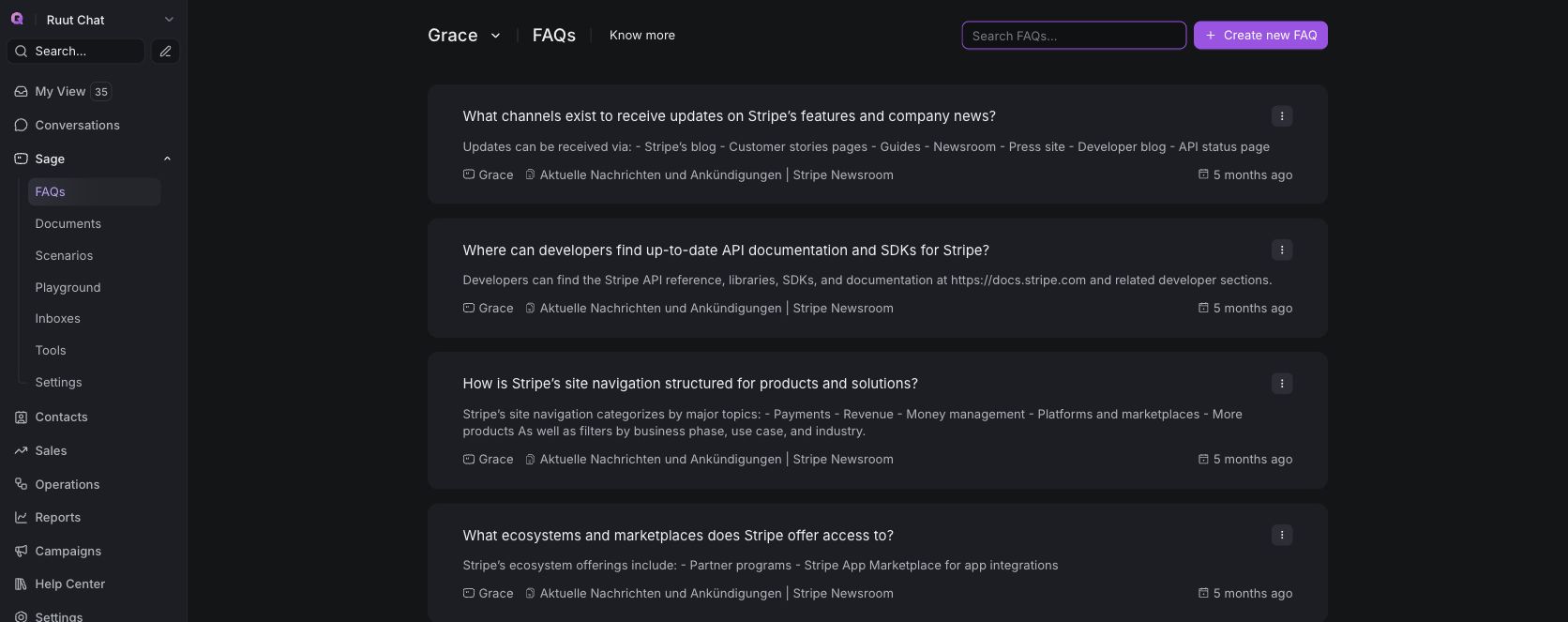
Needs a person?
Your team gets the full story.
Sage knows its limits. When a conversation needs judgment, it assigns the right teammate with a short summary, what it already checked, and a suggested next step. Your customer never has to repeat themselves.
See it in a demoAnswer every call.
Even at 2 AM.
With Ruut Voice, Sage picks up the phone, understands what callers say, and answers out loud using the same knowledge as your chat. It can update details, send an SMS follow-up, or transfer the call to your team.
Explore Ruut VoiceBuilt to help customers.
Not to get in the way.
Always on
Answers in seconds, at 2 PM or 2 AM, so customers never wait for business hours.
Every channel, including voice
One Sage for WhatsApp, email, live chat, social, and phone calls, with the same knowledge everywhere.
Speaks your customers’ language
Replies in the language the customer writes or speaks in, so everyone feels at home.
Grounded in your knowledge
Answers come from your FAQs and documents. When Sage doesn’t know, it says so.
Hands off with context
Your team gets the conversation, a short summary, and what Sage already checked.
You set the rules
Name your assistant, choose its tone, and decide which topics always go to a person.
Results teams see with Ruut.
Bring AI, your team, and every customer conversation together. See how Ruut can help you lower support costs, resolve issues faster, and be there when customers need you.
- 70%lower cost per contact
- 3×faster time to resolution
- 24/7coverage with zero wait times
Secure by design.
Safe by default.
Learn more GDPR
Data protection
View details
TikTok
Messaging Partner
View details
Meta
Business Partner
View detailsWhat teams ask us
about Sage
Will Sage make things up?
No. Sage answers from the FAQs, documents, and Help Center articles you add. If it can’t find a good answer, it tells the customer and brings in your team.
Can I decide when a person takes over?
Yes. Use scenarios to choose which topics always go to your team, like refunds or complaints. Sage hands over with a summary so customers don’t repeat themselves.
Does Sage work on phone calls?
Yes. With Ruut Voice, Sage can answer calls, understand what callers say, reply out loud, or transfer the call to the right person.
How long does it take to set up?
Most teams are ready in an afternoon. Add your knowledge, test Sage in the Playground, then switch it on for the inboxes you choose.
Can I use Ruut without Sage?
Yes. Sage is optional. Your human team can manage every conversation in Ruut, and you can add Sage whenever you are ready.